How to see ChatGPT visitors and their landing pages in Countnest
- The Countnest script on every page (one line in your site's <head>)
- Some days of traffic: ChatGPT visits are small for most sites, so a 30-day range reads best
Which page do you need?
- Setting up AI traffic tracking for the first time, in Countnest or GA4? Read How to see visitors from ChatGPT and other AI assistants.
- Wondering how much traffic ChatGPT sends other sites? Read How much traffic does ChatGPT really send?.
- Using GA4 as well? How to track AI traffic in GA4 and Countnest builds an AI channel in GA4.
- Already have Countnest and want to read your ChatGPT visitors? This guide is the click-by-click part: which tab, which table, which filter, in order.
Definitions
- ChatGPT visitor: a person who clicked a link in ChatGPT and arrived on your site with a ChatGPT signal: the referrer or the tag. Bots that read your pages for OpenAI are not visitors.
- Landing page (entry page): the first page of a visit. Countnest stores it as the path only, for example
/pricing, without the?utm_source=...part. - Referrer: the address of the page the visitor came from, sent by the browser. Browsers' default rule sends only the origin to other sites (MDN, checked 21 November 2026), so at most you see
https://chatgpt.com/, never the chat itself. - utm_source=chatgpt.com: a tag in the link. OpenAI's publisher FAQ said ChatGPT "automatically includes the UTM parameter utm_source=chatgpt.com in referral URLs" (Web Archive copy of 4 October 2026; on 21 November 2026 the live FAQ address showed an unrelated help article).
- AI share: AI-assistant visits as a percentage of all visits in the selected period.
How Countnest decides a visit came from ChatGPT
| Signal | What Countnest looks for | Checked |
|---|---|---|
| Tag in the link | utm_source is chatgpt.com, chatgpt or openai (any capitals) | First |
| Referrer | chatgpt.com, chat.openai.com or openai.com, with or without www. or another subdomain | Second |
| Neither | Not ChatGPT. The visit is Direct, as in every analytics tool |
The tag goes first for a reason. Search Engine Land reported on 20 October 2026 that "referral information is still missing from most ChatGPT clicks", which makes the tag the main signal. The same report covers the week of 8 to 15 October 2026, when ChatGPT links lost the tag after the GPT-6 release and visits moved to Direct until a fix began rolling out on 15 October. That account came from Adobe's Cedric Huesler; OpenAI has not published its own statement.
For scale: in Ahrefs' benchmark of 118,671 sites (page updated 20 November 2026), ChatGPT sent 0.36% of all visits in October 2026, against 24.74% from Google. So expect small numbers, and read them over weeks, not days.
Part 1: make sure ChatGPT visits are counted
Step 1: Start a trial and add your site
If you are new to Countnest, start a 30-day free trial (no card needed) and add your website. If you already use Countnest, skip to step 3.
Step 2: Install the script on every page
Paste the one-line script into your site's
<head>:<script defer src="https://countnest.com/c.js" data-site="YOUR-SITE-ID"></script>It is about 2.6 KB (about 1.4 KB compressed) and loads with
defer. ChatGPT can send people to any page, not only your homepage, so the script must be in the template every page uses. The install docs cover WordPress, Next.js and other platforms, and the free third-party tracker checker shows whether a page loads it. You do not need to set anything up for ChatGPT: it is recognised automatically from the first visit.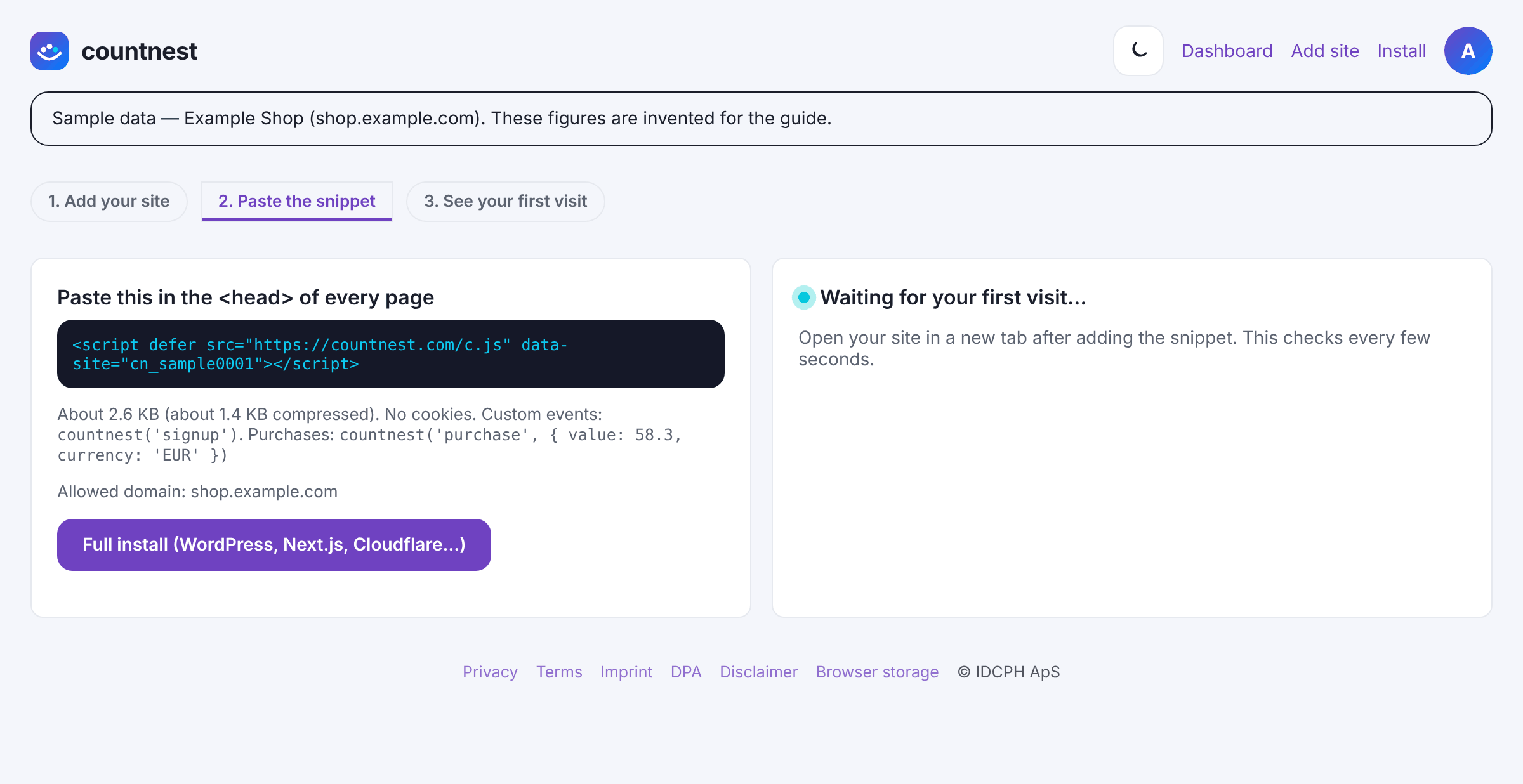
Sample data in the Countnest dashboard (light theme).

Part 2: find ChatGPT in the AI traffic tab
Step 3: Open AI traffic and pick 30d
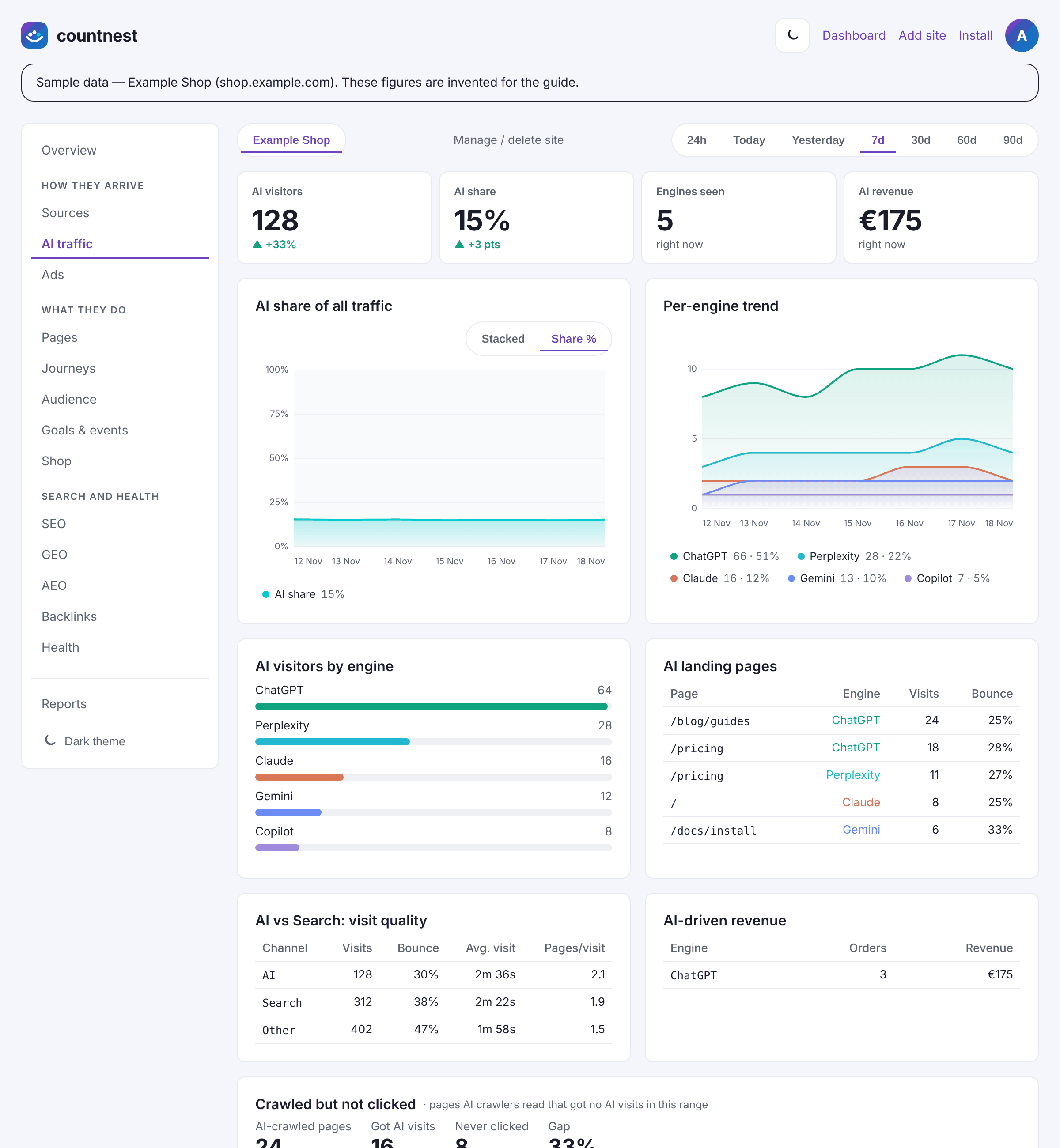
In the dashboard sidebar, under How they arrive, click AI traffic. At the top, the range pills read 24h, Today, Yesterday, 7d, 30d, 60d and 90d. The dashboard opens on 24h; click 30d, because ChatGPT numbers are small and jumpy day to day.
Sample data in the Countnest dashboard (light theme). Step 4: Read the top row
The four numbers are AI visitors, AI share (in points against the previous period), Engines seen and AI revenue. AI revenue only fills in if your site sends a purchase event with a value. If AI share is around 0.3 to 0.5%, you are in line with the large benchmarks; much higher usually means assistants cite you often for your topic.
Step 5: Find ChatGPT among the engines
AI visitors by engine gives each of the 17 assistants Countnest recognises its own row; ChatGPT is usually the longest bar. Per-engine trend shows a line per assistant over the range, and AI share of all traffic shows the AI share over time. If the per-engine chart says there is not enough data yet, pick 60d or 90d.

Part 3: see the pages ChatGPT sends people to
Step 6: Read the AI landing pages table
AI landing pages lists the first page of each AI visit, with the columns Page, Engine, Visits and Bounce. Each row is one page and one assistant, so the same page can appear once for ChatGPT and once for Perplexity. The table shows the top 15 rows. Bounce here means visits that viewed only one page. A page with many ChatGPT visits is a page ChatGPT trusts for a topic: keep its first paragraph a clear, accurate answer.
Step 7: Filter the whole dashboard to ChatGPT
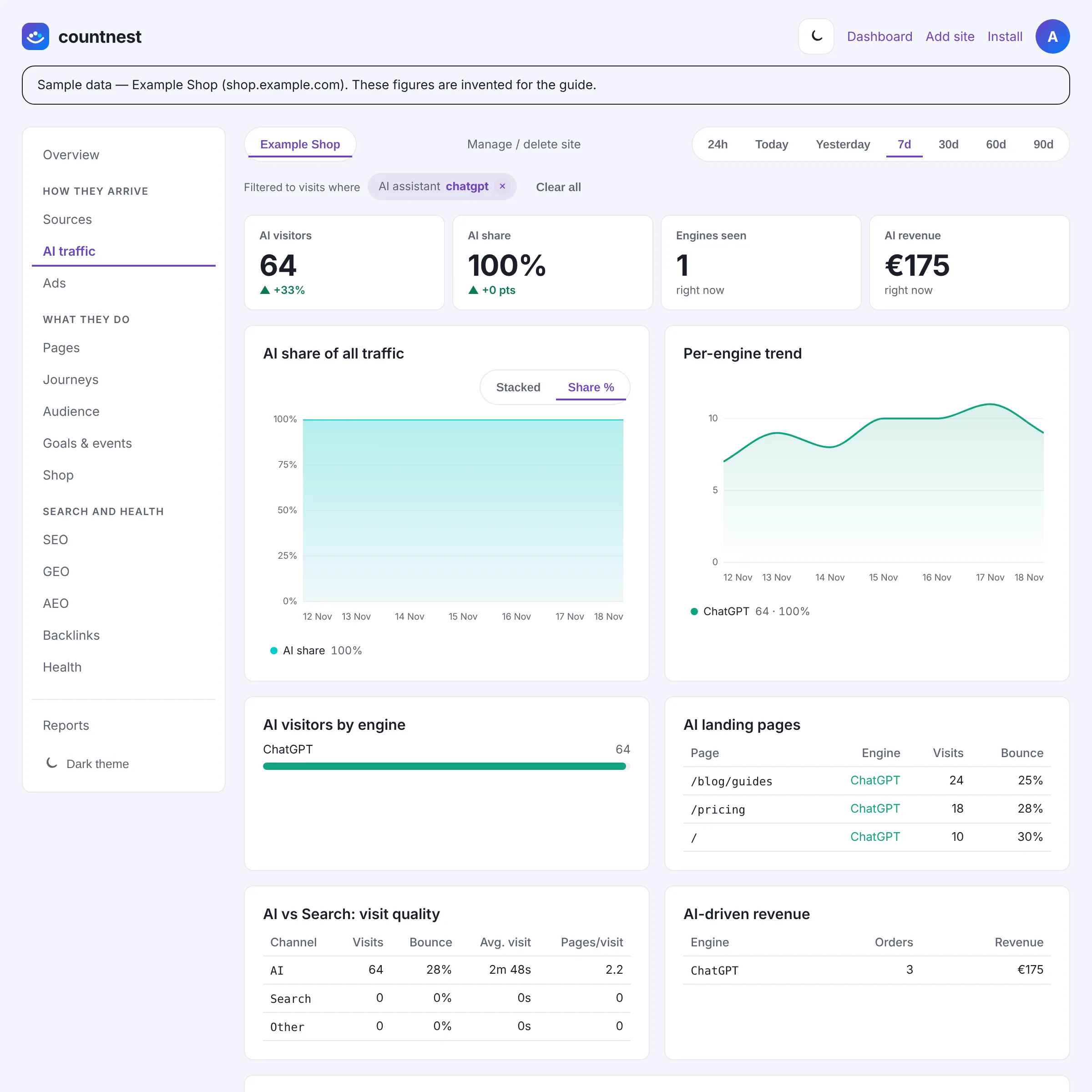
Click ChatGPT in AI visitors by engine. A bar appears under the range pills: Filtered to visits where AI assistant
chatgpt. Every traffic report, from Pages and Journeys to Audience, Goals & events and Shop, now shows ChatGPT visits only, and AI share reads 100% because only that assistant is included. The filter is kept in the page address, so you can bookmark it. Remove it with the × on the chip, or click Clear all.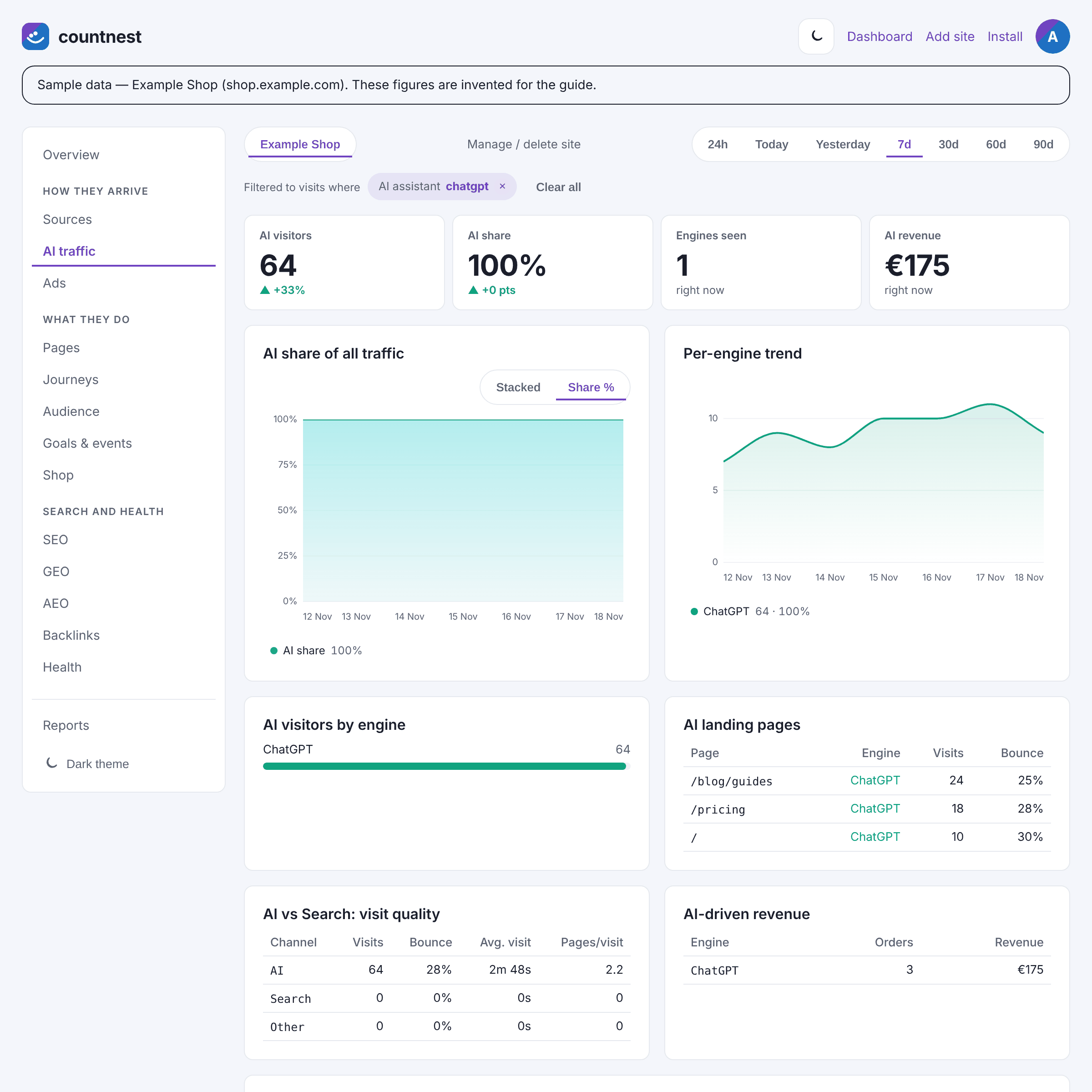
Sample data in the Countnest dashboard (light theme). Step 8: Open Pages for entry pages and time on page
With the ChatGPT filter on, open Pages. Entry pages lists where ChatGPT visitors landed, with Entries, Bounce and Avg. visit. Top pages shows every page they viewed, including the ones they moved on to, and Engaged time and scroll per page shows how far they read. Click a page in Entry pages to add an Entry page filter on top of ChatGPT; you can combine up to 3 filters.
Step 9: See where ChatGPT visitors went next
Open Journeys. In Visit journeys, choose What happened next and pick your ChatGPT landing page under Start from. You see the next pages within the same visit, for example from a blog post to
/pricing. Countnest never links visits together, so these are paths inside one visit, not a profile of a person.
Part 4: check the tag and the referrer
Step 10: Find ChatGPT in Sources
Click Clear all, then open Sources. In Channels, ChatGPT visits are part of the AI assistants row. In Referrers,
chatgpt.comappears only for visits whose browser sent a referrer. Expect this number to be lower than ChatGPT in the AI traffic tab: visits that carried only the tag count as ChatGPT but have no referrer to show.Step 11: Look for utm_source=chatgpt.com in UTM campaigns
Scroll to UTM campaigns. Rows with the source
chatgpt.comare visits whose link carried OpenAI's tag; medium and campaign are usually empty. Clickchatgpt.comin the Source column to filter the dashboard by UTM source. If you tag your own links to ChatGPT-related campaigns, use the free UTM link builder so the values stay consistent.Step 12: Read Source → landing page → conversion
At the bottom of Sources, Source → landing page → conversion pairs each source with its landing page, with Visits, Converted and Rate. Rows for ChatGPT show which landing pages lead to action. Converted means the visit sent a purchase or a custom event.
Part 5: count what ChatGPT visitors do
Step 13: Add a goal and read it by AI engine
Open Goals & events. In the Goals card, fill in Goal name (for example
Signed up), choose a Goal type (Event name, Page path, Scroll depth or Form submission), type the Match (for example/thank-youorsignup) and click Add goal. Each goal then shows its conversion rate, plus a By source table and a By AI engine table with Conv. and Rate for ChatGPT. Scroll and form goals need no code.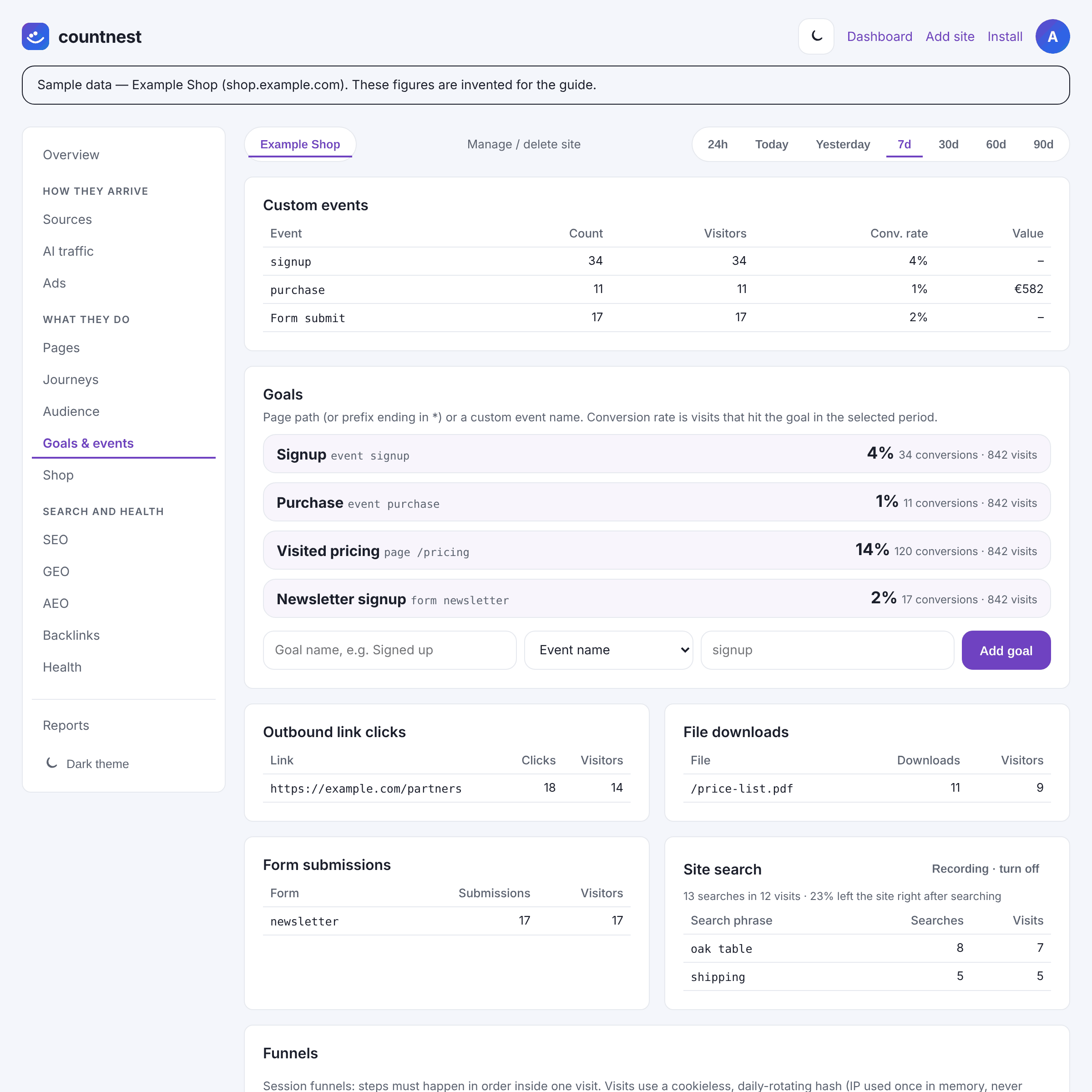
Sample data in the Countnest dashboard (light theme). Step 14: Compare ChatGPT visits with search visits
Back on AI traffic, AI vs Search: visit quality compares Visits, Bounce, Avg. visit and Pages/visit for AI, search and all other traffic. AI-driven revenue lists orders and revenue per assistant if you send purchase events. Together they tell you whether ChatGPT visitors are worth more attention than their numbers suggest.
Step 15: Add a note for 8 to 15 October 2026
On Overview, click + Add note under the Visitors chart, choose 8 October 2026 as the Date, write
ChatGPT tag bug 8-15 Oct, visits moved to Directin Note and click Save note. The pin keeps a dip in ChatGPT and a rise in Direct from looking like lost interest when you compare periods with 60d or 90d. Add a note the same way after any big ChatGPT release.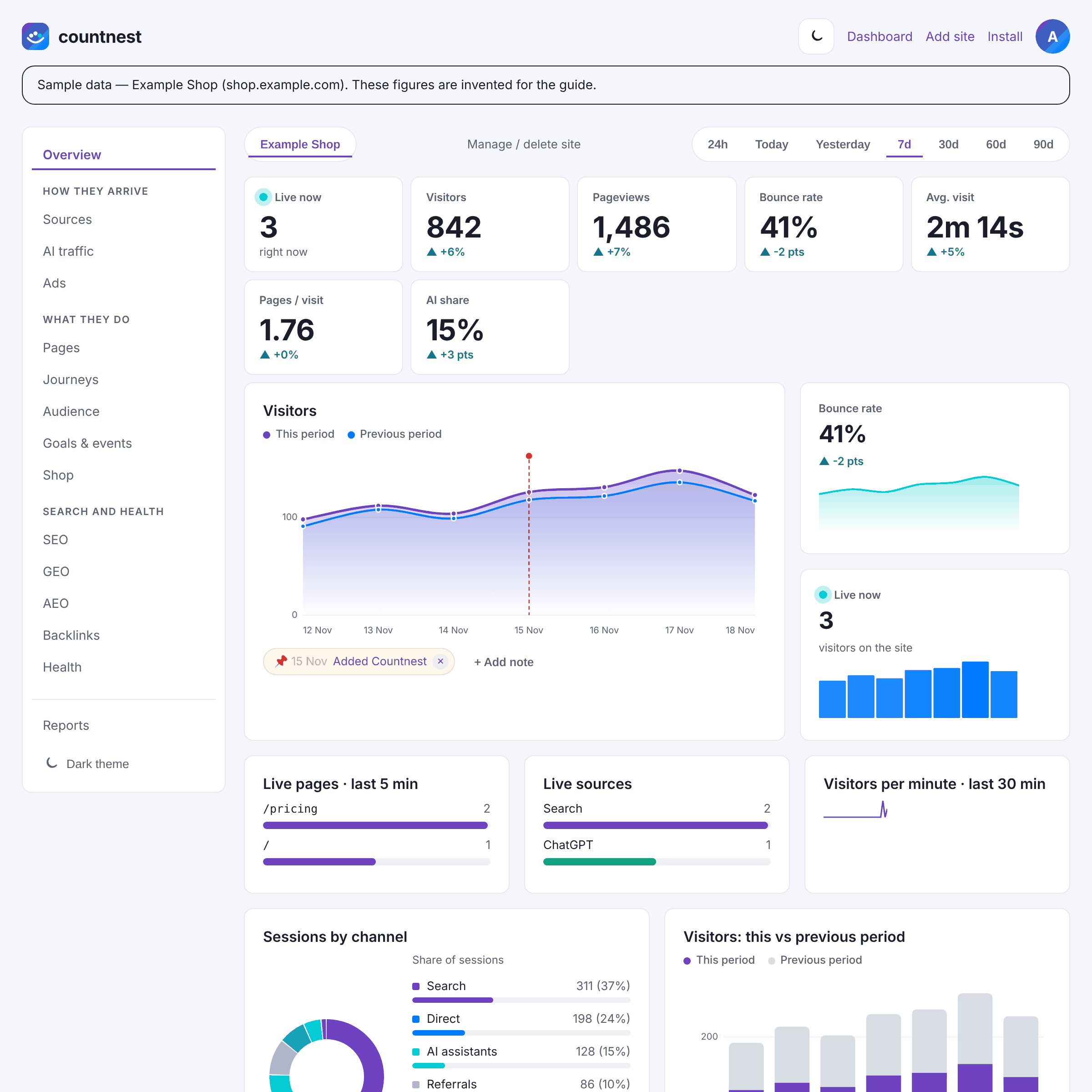
Sample data in the Countnest dashboard (light theme).


How Countnest does this
Countnest is privacy-friendly web analytics from IDCPH ApS in Copenhagen, with an AI traffic view built in. For ChatGPT, that means:
- Two signals, tag first. The classifier reads
utm_sourcebefore the referrer, so a tagged click with no referrer still counts as ChatGPT. The full list of 17 assistants, including ChatGPT, Perplexity, Gemini, Claude, Copilot, DeepSeek, Grok and Meta AI, is maintained in one place and updated as assistants change how they link. - One click from engine to everything. The ChatGPT filter works on every tab: pages, journeys, audience, goals and shop.
- Landing pages per assistant, with visits and bounce rate, without building a report.
- Goals per AI engine. Every goal shows conversions and rate for ChatGPT next to search and other sources.
- Crawlers kept apart. OpenAI's bots (OAI-SearchBot, GPTBot, ChatGPT-User) are not visitors. If your server logs them, they appear in a separate AI crawlers card and are never counted as visits.
- Counting without tracking people. Countnest never saves IP addresses and stores nothing on visitors' devices. It shows totals and trends, not individual people, and data is stored in the EU.
What you will and won't see
| You will see | You won't see |
|---|---|
| ChatGPT visits with the tag or the referrer | Visits with neither: they are Direct in every tool |
| The landing page path | The question the person asked ChatGPT |
| Pages viewed in the same visit, goals and orders | The same person on another day (visits are never linked) |
| A note-worthy dip, such as 8 to 15 October 2026 | People who read an answer and later search for you: they arrive as search or Direct |
A copied ChatGPT link keeps its tag, so a few "ChatGPT" visits can be links people shared. Google's AI Overviews and AI Mode are part of Google Search, not ChatGPT; see how to measure Google AI Overviews traffic.
Help ChatGPT find your pages
OpenAI's crawler page says sites that block OAI-SearchBot "will not be shown in ChatGPT search answers, though can still appear as navigational links", and recommends allowing it. The free AI readiness checker shows whether your robots.txt lets OAI-SearchBot and other AI crawlers in. Our guide to robots.txt for AI crawlers explains the choices.
A note on consent
Whether you need consent for analytics depends on your country and on what a tool does, for example whether it stores or reads information on the device or stores IP addresses. No tool can promise that you never need consent. This is general information, not legal advice. Official sources: the ePrivacy Directive (2002/58/EC), the GDPR (2016/679) and the EDPB Guidelines 2/2023 on the technical scope of Art. 5(3) ePrivacy. Our overview: Do I need a consent banner for website analytics?.
What it costs after the trial
Countnest has no free plan. The trial lasts 30 days, needs no card, and includes the AI traffic tab. After it you choose Starter at $14 a month (1 site, 20,000 sessions), Growth at $29 (5 sites, 100,000 sessions) or Agency at $79 (25 sites, 500,000 sessions), VAT included, with about 2 months free on yearly billing. Every plan has the AI traffic tab and every analytics report. If you do nothing, the trial simply ends. See pricing.
Free tools that help
- AI readiness checker: see which AI crawlers your robots.txt allows.
- UTM link builder: tag your own links consistently.
- Third-party tracker checker: confirm the Countnest script runs on a page.
How we checked
On 21 November 2026 we followed every step against the labels in the Countnest dashboard code (the AI traffic, Pages, Journeys, Sources, Goals & events and Overview tabs, the filter bar and the AI assistant list) and took the screenshots from sample data. We read OpenAI's crawler page, the Web Archive copy of OpenAI's publisher FAQ (the live address showed an unrelated article that day), Search Engine Land's report on the October 2026 tag bug, MDN's Referrer-Policy page and Ahrefs' AI vs Search benchmark (all listed under Sources). ChatGPT and OpenAI are trademarks of OpenAI. Countnest is not affiliated with or endorsed by OpenAI. If something here is out of date, tell us at support@countnest.com and we will fix it.
Questions and answers
Where do I see ChatGPT traffic in Countnest?
In the AI traffic tab. ChatGPT has its own row in AI visitors by engine, and AI landing pages lists the pages it sent people to. Click ChatGPT to filter every tab to ChatGPT visits.
Why is chatgpt.com lower in Referrers than ChatGPT in the AI traffic tab?
Because many ChatGPT clicks arrive without a referrer. Countnest still counts them as ChatGPT when the link carries utm_source=chatgpt.com, but there is no referrer to list. Search Engine Land reported in October 2026 that referral information is missing from most ChatGPT clicks.
Does Countnest need a setup step for ChatGPT?
No. Once the script is on your pages, ChatGPT is recognised from the tag (utm_source=chatgpt.com, chatgpt or openai) or the referrer (chatgpt.com, chat.openai.com, openai.com). There is no channel or regex to build.
Can I see which ChatGPT visitors signed up or bought?
You see totals, not people. Add a goal in Goals & events and each goal shows conversions and rate for ChatGPT in its By AI engine table. With purchase events, AI-driven revenue shows orders and revenue per assistant.
Can I see what people asked ChatGPT?
No. ChatGPT does not send the question, and browsers send at most the origin (https://chatgpt.com/) as the referrer. You see where the visit came from and where it landed.
Why did my ChatGPT visits drop in October 2026?
Probably the tag bug reported for 8 to 15 October 2026, when ChatGPT links lost utm_source=chatgpt.com and many visits were counted as Direct. A fix began rolling out on 15 October, according to reports. Add a note for those dates and compare ChatGPT and Direct on the same landing pages.
Are OpenAI's crawlers counted as ChatGPT visitors?
No. OAI-SearchBot, GPTBot and ChatGPT-User fetches are bots, not visits. If your server logs them, Countnest shows them in a separate AI crawlers card.
30-day free trial, no card required. Then from $14 a month. Cancel anytime.
Start free for 30 daysSources
- OpenAI Help Center: Publishers and developers FAQ (utm_source=chatgpt.com; Web Archive copy of 4 October 2026 read on 21 November 2026, when the live address showed an unrelated article)
- Web Archive copy of OpenAI's Publishers and developers FAQ (4 October 2026)
- OpenAI: Overview of OpenAI crawlers (OAI-SearchBot, GPTBot, ChatGPT-User)
- Search Engine Land: ChatGPT drop in UTM tracking was a bug (20 October 2026)
- MDN Web Docs: Referrer-Policy (default strict-origin-when-cross-origin)
- Ahrefs: AI vs Search Traffic Analysis benchmark (118,671 sites, updated 20 November 2026, October 2026 data)
- Countnest pricing
- Countnest install docs